(2/6) AI in Multiple GPUs: Point-to-Point and Collective Operations
This article is part of a series about distributed AI across multiple GPUs:
- Part 1: Understanding the Host and Device Paradigm
- Part 2: Point-to-Point and Collective Operations (this article)
- Part 3: How GPUs Communicate
- Part 4: Gradient Accumulation & Distributed Data Parallelism (DDP)
- Part 5: ZeRO (coming soon)
- Part 6: Tensor Parallelism (coming soon)
Introduction
In the previous post, we established the host-device paradigm and introduced the concept of ranks for multi-GPU training. Now, we’ll explore the specific communication patterns provided by PyTorch’s torch.distributed module to coordinate work and exchange data between these ranks. These operations, known as collectives, are the building blocks of distributed training.
Although PyTorch exposes these operations, it ultimately calls a backend framework that actually implements the communication. For NVIDIA GPUs, it’s NCCL (NVIDIA Collective Communications Library), while for AMD it’s RCCL (ROCm Communication Collectives Library).
NCCL implements multi-GPU and multi-node communication primitives optimized for NVIDIA GPUs and networking. It automatically detects the current topology (communication channels like PCIe, NVLink, InfiniBand) and selects the most efficient one.
Since NVIDIA GPUs are the most common, we’ll focus on the
NCCLbackend for this post.
For brevity, the code presented below only provides the main arguments of each method instead of all available arguments.
Point-to-Point (One-to-One)
These operations are not considered collectives, but they are foundational communication primitives. They facilitate direct data transfer between two specific ranks and are fundamental for tasks where one GPU needs to send specific information to another.
- Synchronous (Blocking): The program waits for the operation to be enqueued before proceeding. For CPU tensors, the rank process is blocked until the transfer is completed. For GPU tensors, it blocks only until the operation is submitted to the GPU’s command queue.
torch.distributed.send(tensor, dst): Sends a tensor to a specified destination rank.torch.distributed.recv(tensor, src): Receives a tensor from a source rank. The receiving tensor must be pre-allocated with the correct shape anddtype.
- Asynchronous (Non-Blocking): The program initiates the transfer and immediately continues with other tasks. This allows for overlapping communication with computation. Both operations return a
requestobject that can be used to track the status.torch.distributed.isend(tensor, dst): Initiates an asynchronous send operation.torch.distributed.irecv(tensor, src): Initiates an asynchronous receive operation.request.wait(): Blocks execution until the specific asynchronous operation is complete.
Major “Gotchas” in NCCL
While send and recv are labeled “synchronous,” their behavior in NCCL can be confusing, so let me clarify things before you get confused when running your tests. A synchronous call on a CUDA tensor blocks the host CPU thread only until the data transfer kernel is launched on the GPU, not until the transfer is complete. The CPU is then free to enqueue other tasks. Asynchronous operations are generally preferred as they make this overlap explicit.
There is an exception: the very first call to torch.distributed.recv() in a process is truly blocking and waits for the transfer to finish, likely due to internal NCCL warm-up procedures. Subsequent calls will only block until the operation is enqueued.
Consider this example where rank 1 hangs because the CPU tries to access a tensor that the GPU has not yet received:
rank = torch.distributed.get_rank()
if rank == 0:
   t = torch.tensor([1,2,3], dtype=torch.float32, device=device)
   # torch.distributed.send(t, dst=1) # No send operation is performed
else: # rank == 1 (assuming only 2 ranks)
   t = torch.empty(3, dtype=torch.float32, device=device)
   torch.distributed.recv(t, src=0) # Blocks only until enqueued (after first run)
   print("This WILL print if NCCL is warmed-up")
   print(t) # CPU needs data from GPU, causing a block
   print("This will NOT print")
The CPU process at rank 1 gets stuck on print(t) because it triggers a host-device synchronization to access the tensor’s data, which never arrives.
If you run this code multiple times, notice that
This WILL print if NCCL is warmed-upwill not get printed in the following executions, since the CPU is still stuck atprint(t)from the previous run.
Collectives
Every collective operation function supports both sync and async operations through the async_op argument. It defaults to False, meaning synchronous operations.
One-to-All Collectives
These operations involve one rank sending data to all other ranks in the group.
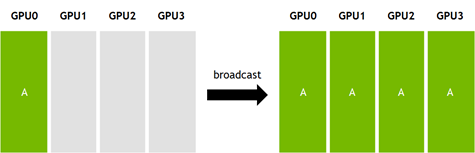
torch.distributed.broadcast(tensor, src): Copies a tensor from a single source rank (src) to all other ranks. Every process ends up with an identical copy of the tensor. Thetensorhas two purposes, (1) when the rank of the process matches thesrc, thetensoris the data being sent (2) otherwisetensoris used to save the received data.rank = torch.distributed.get_rank() if rank == 0: # source rank tensor = torch.tensor([1,2,3], dtype=torch.int64, device=device) else: # destination ranks tensor = torch.empty(3, dtype=torch.int64, device=device) torch.distributed.broadcast(tensor, src=0)
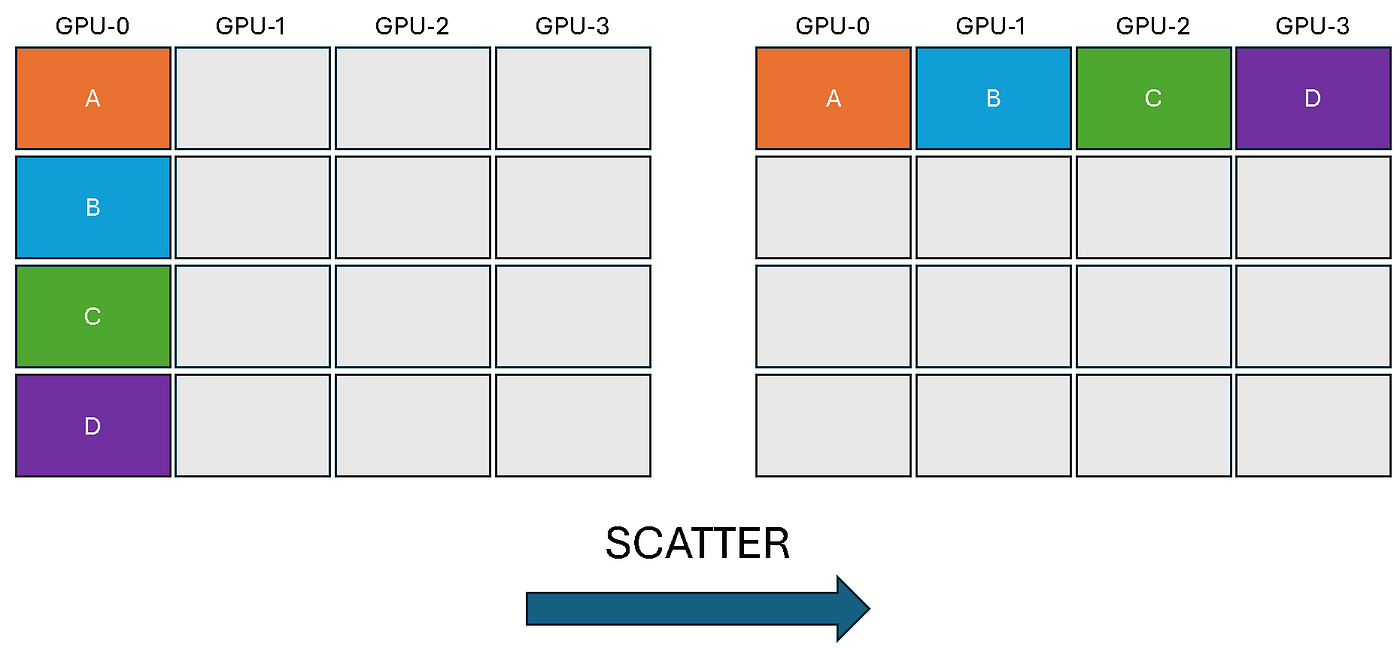
torch.distributed.scatter(tensor, scatter_list, src): Distributes chunks of data from a source rank across all ranks. Thescatter_liston the source rank contains multiple tensors, and each rank (including the source) receives one tensor from this list into itstensorvariable.# The scatter_list must be None for all non-source ranks. scatter_list = None if rank != 0 else [torch.tensor([i, i+1]).to(device) for i in range(0,4,2)] output = torch.empty(2, dtype=torch.int64).to(device) torch.distributed.scatter(output, scatter_list, src=0) print(f'Rank {rank} received: {output}')
All-to-One Collectives
These operations gather data from all ranks and consolidate it onto a single destination rank.
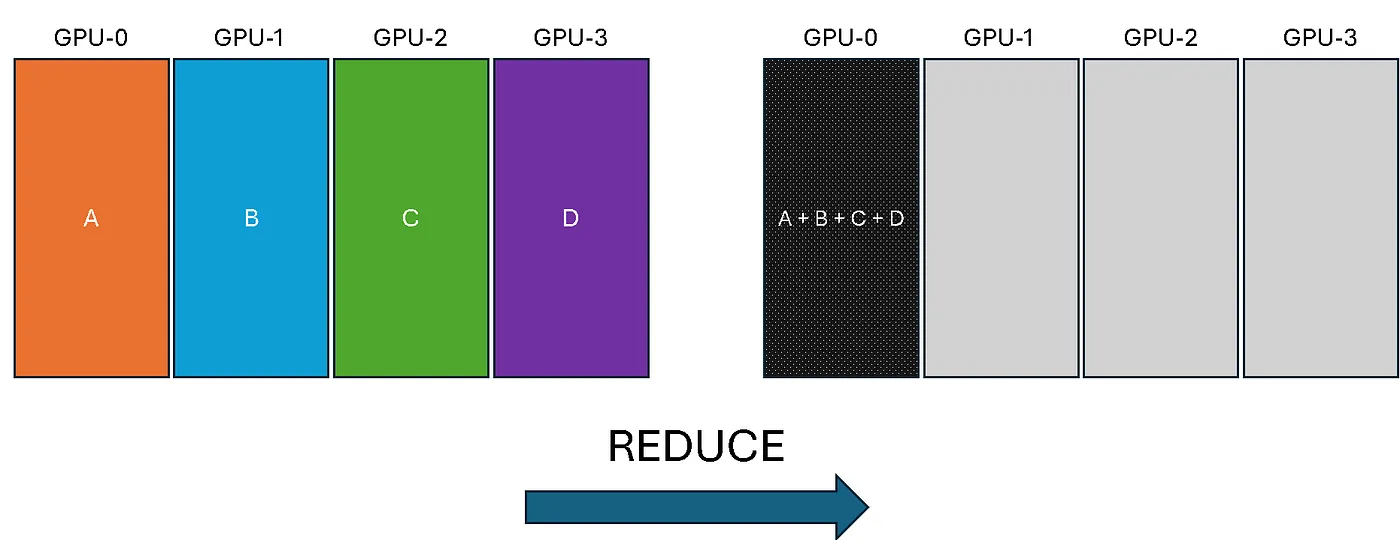
torch.distributed.reduce(tensor, dst, op): Takes a tensor from each rank, applies a reduction operation (likeSUM,MAX,MIN), and stores the final result on the destination rank (dst) only.rank = torch.distributed.get_rank() tensor = torch.tensor([rank+1, rank+2, rank+3], device=device) torch.distributed.all_reduce(tensor, op=torch.distributed.ReduceOp.SUM) print(tensor)
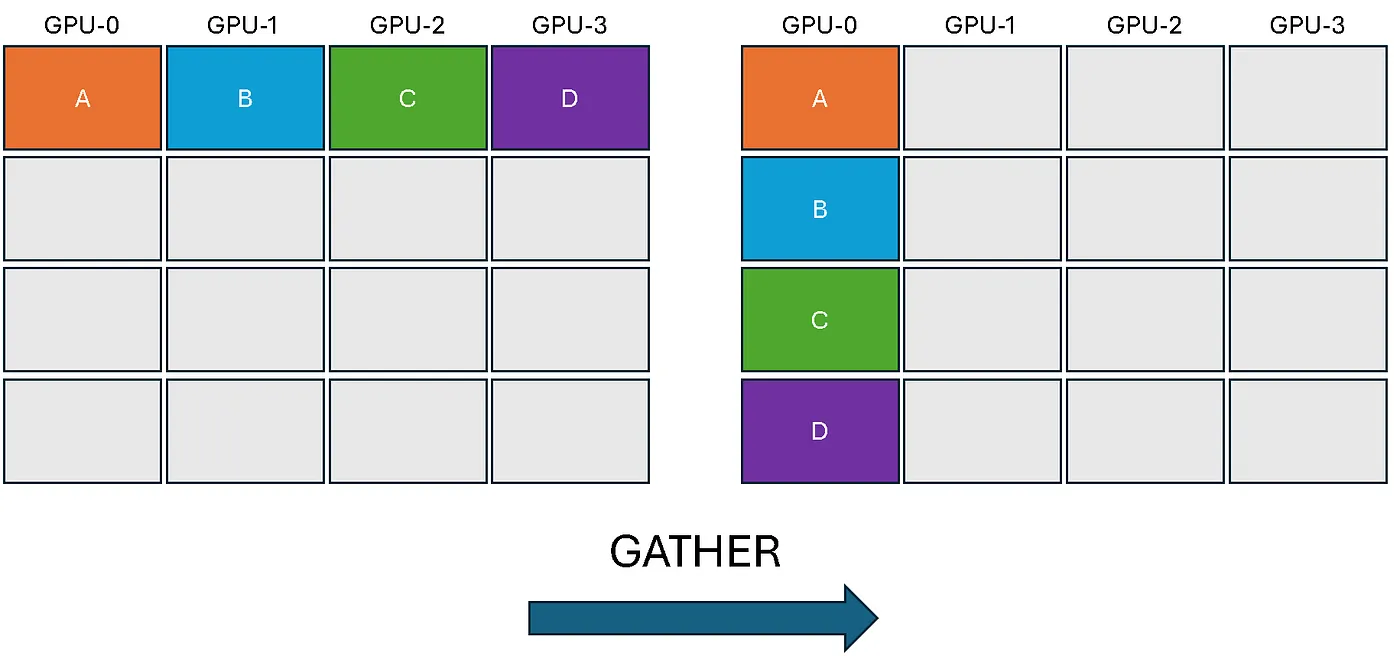
torch.distributed.gather(tensor, gather_list, dst): Gathers a tensor from every rank into a list of tensors on the destination rank. Thegather_listmust be a list of correctly sized tensors on the destination andNoneeverywhere else.# The gather_list must be None for all non-destination ranks. rank = torch.distributed.get_rank() world_size = torch.distributed.get_world_size() gather_list = None if rank != 0 else [torch.zeros(3, dtype=torch.int64).to(device) for _ in range(world_size)] t = torch.tensor([0+rank, 1+rank, 2+rank], dtype=torch.int64).to(device) torch.distributed.gather(t, gather_list, dst=0) print(f'After op, Rank {rank} has: {gather_list}')
The variable world_size is the total number of ranks. It can be obtained with torch.distributed.get_world_size(). But don’t worry about implementation details for now, the most important thing is to grasp the concepts.
All-to-All Collectives
In these operations, every rank both sends and receives data from all other ranks.
torch.distributed.all_reduce(tensor, op): Same asreduce, but the result is stored on every rank instead of just one destination.
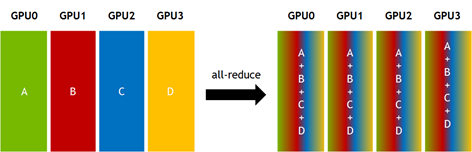
# Example for torch.distributed.all_reduce
rank = torch.distributed.get_rank()
tensor = torch.tensor([rank+1, rank+2, rank+3], dtype=torch.float32, device=device)
torch.distributed.all_reduce(tensor, op=torch.distributed.ReduceOp.SUM)
print(f"Rank {rank} after all_reduce: {tensor}")
torch.distributed.all_gather(tensor_list, tensor): Same asgather, but the gathered list of tensors is available on every rank.
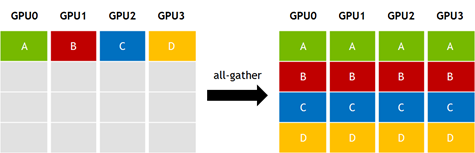
# Example for torch.distributed.all_gather
rank = torch.distributed.get_rank()
world_size = torch.distributed.get_world_size()
input_tensor = torch.tensor([rank], dtype=torch.float32, device=device)
tensor_list = [torch.empty(1, dtype=torch.float32, device=device) for _ in range(world_size)]
torch.distributed.all_gather(tensor_list, input_tensor)
print(f"Rank {rank} gathered: {[t.item() for t in tensor_list]}")
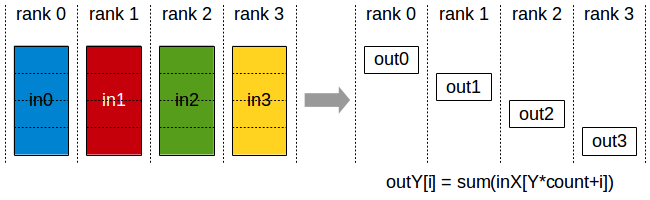
torch.distributed.all_gather_into_tensor(output_tensor, input_tensor): A more efficient version ofall_gather. It gathers tensors from all ranks into a single, stackedoutput_tensoron every rank.# Example for torch.distributed.all_gather_into_tensor rank = torch.distributed.get_rank() world_size = torch.distributed.get_world_size() input_tensor = torch.tensor([rank], dtype=torch.float32, device=device) output_tensor = torch.empty(world_size, dtype=torch.float32, device=device) torch.distributed.all_gather_into_tensor(output_tensor, input_tensor) print(f"Rank {rank} gathered tensor: {output_tensor}")torch.distributed.reduce_scatter(output, input_list): Performs a reduce operation on a list of tensors and then scatters the results. Each rank receives a different part of the reduced output.# Example for torch.distributed.reduce_scatter rank = torch.distributed.get_rank() world_size = torch.distributed.get_world_size() input_list = [torch.tensor([rank + i], dtype=torch.float32, device=device) for i in range(world_size)] output = torch.empty(1, dtype=torch.float32, device=device) torch.distributed.reduce_scatter(output, input_list, op=torch.distributed.ReduceOp.SUM) print(f"Rank {rank} received reduced value: {output.item()}")
Synchronization
The two most frequently used operations are request.wait() and torch.cuda.synchronize(). It’s crucial to understand the difference between these two:
request.wait(): This is used for asynchronous operations. It synchronizes CUDA streams for that specific operation, ensuring the default stream waits for the communication to complete before proceeding. For GPU collectives, it does not block the host CPU thread, it only blocks the currently active CUDA stream (if you’re not familiar with streams, don’t worry about it for now, just understand that the GPU is blocked). For CPU collectives, it will block the host process until the operation is completed.torch.cuda.synchronize(): This is a more forceful command that pauses the host CPU thread until all previously queued tasks on the GPU have finished. It guarantees that the GPU is completely idle before the CPU moves on, but it can create performance bottlenecks if used improperly. Whenever you need to perform benchmark measurements, you should use this to ensure you capture the exact moment the GPUs are done.
Conclusion
Congratulations for reading all the way to the end! In this post you learned about:
- Point-to-Point Operations
- Sync and Async in NCCL
- Collective operations
- Synchronization methods
In the next blog post we’ll dive into PCIe, NVLink and other mechanisms that enable communication in a distributed setting!